Cinematic sky with a paper plane over a valley
Mellow
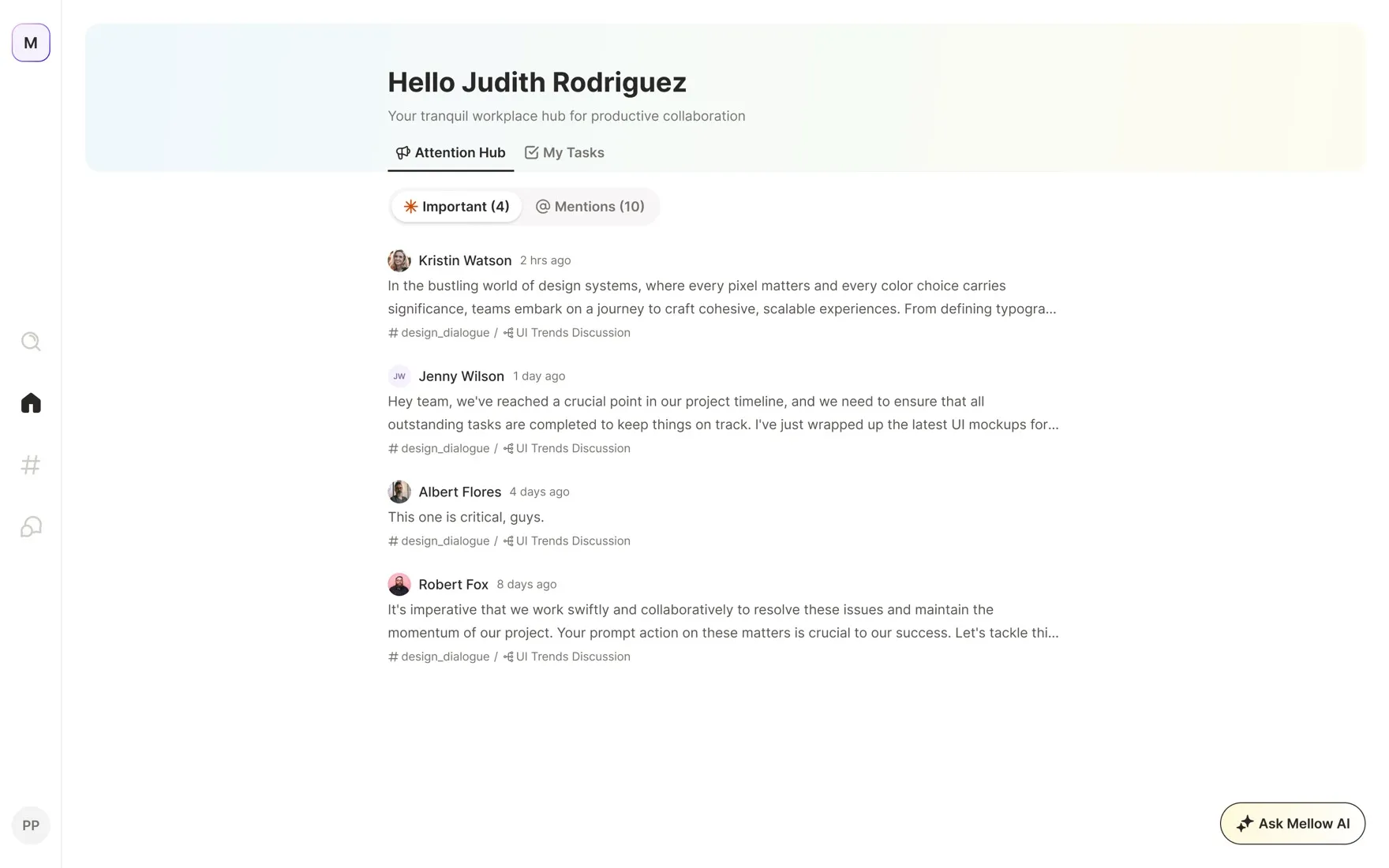
Mellow home — the AI Attention Hub

The problem

Teams live in two tools at once — a chat app and a task tracker — and context leaks out of the seam: links pasted back and forth, status duplicated, decisions buried in a DM.

The brief: collapse the two into one surface, without either the chat or the tasks feeling bolted on.

Approach

Three principles

One surface, shared primitives. A message and a task are the same object from two angles — any message can become a task; any task keeps the thread that made it.

AI as triage, not a chatbot.The assistant doesn't wait to be asked — it surfaces the few things that need you and stays quiet otherwise.

Calm by default. Light surface, generous whitespace, one accent, restraint with colour — so real signal reads as signal.

Getting in

Onboarding splits in two. A single-purpose auth screen gets you through the door — Google or email, nothing else on the page — while a preview of the live app sits alongside so the payoff is visible before you commit.

The rest of sign-up keeps to one decision per screen: confirm a code sent to your inbox, then set a name, photo, and password — with inline validation (“that's great, your password meets the requirements”) so you never submit and bounce.

Once you're in, setup does the heavier lifting: a short, progress-tracked flow to name the organisation, size it, and capture role and function. Those answers seed sensible defaults — which workspaces to suggest, who to invite — so the first real screen already feels populated rather than empty.

The last step turns setup into a team: invite people by email or a shareable link, each added with a Member or Admin role up front — or skip it and come back once the workspace is live.

The Attention Hub

Home is the assistant's work made visible. Instead of an unread-count firehose, it opens on an Attention Hub: Important — what the assistant judged worth surfacing — and Mentions, where you've been pulled in by name. Every card carries its source (workspace / topic) and opens straight into the originating thread.

A second tab, My Tasks, groups everything assigned to you by status — To do, In Progress — with priority and due date inline. It's the same data the workspaces hold, filtered down to just you, so the first thing you see each morning is a plan rather than a backlog.

Mellow AI

The assistant is one tap away — Ask Mellow AI opens over whatever you're on and starts from prompts drawn from your actual work: pending tasks, upcoming deadlines, who's on a campaign, unresolved threads.

Ask in plain language and it answers with grounded context — reading across your tasks, threads, and deadlines instead of guessing. Every conversation is kept in Recents so you can pick a thread back up.

Workspaces & Topics

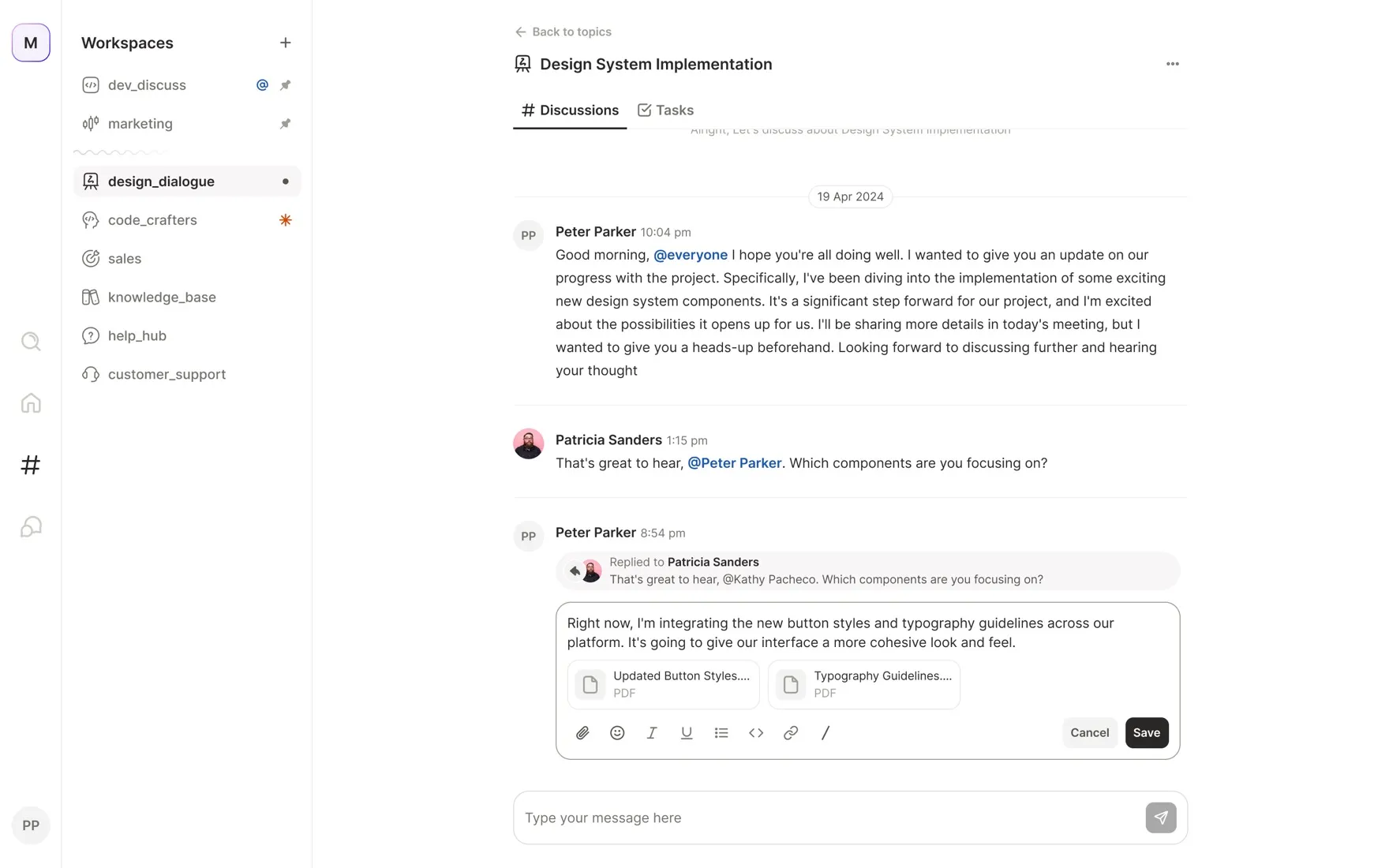
A workspace is a team's shared space. The left rail lists them — dev_discuss, marketing, design_dialogue, and so on — with pinned workspaces floated to the top and small markers for mentions and important activity, so the rail itself is a glanceable status board.

Inside each workspace, conversation is organised into Topics rather than one endless channel. A topic can be Active or Closed, shows its last message and unread markers, and carries both a Discussions tab and a Tasks tab — the two halves of the same subject living side by side.

Creating a workspace is deliberately light: a name, an optional description, and people added inline from search — all in a single modal, no multi-step wizard. Editing and deleting flow through the same panel.

Membership stays editable after the fact: a Manage People panel searches the directory, shows everyone currently in the space, and adds or removes them one click at a time — the same lightweight model as creating the workspace, reused rather than reinvented.

Discussions

Discussions carry the full messaging model you'd expect — @mentions, threaded replies, emoji reactions, and a rich composer with inline formatting and file attachments. Replies quote the message they answer, so a long thread stays legible instead of fragmenting.

Because a topic is a container and not just a chat, this is also where a message becomes work: any message can be promoted to a task in the topic's Tasks tab, and long threads condense into an AI summary with linked sources — so stepping away for a day doesn't mean scrolling back through all of it.

Tasks

Tasks live inside the same topic as the conversation that spawned them, viewable as a grouped List or a Kanban board. Both share one control row — Group By (Status, Priority, Assignee, Due Date) and a Show Completed toggle — so switching views never means relearning the surface.

The Kanban board columns by status with live counts, and every card keeps the same anatomy as its list row — assignee, priority dot, due date, and the topic tag that links it back to its conversation. Drag states, hover, and empty columns were all drawn so the board holds up whether a team has three tasks or thirty.

Direct messages

DMs share the same primitives as topics — a message can still become a task, and read receipts, typing, and delivery states are handled end to end. The composer surfaces attach, emoji, and send in one row rather than hiding them behind a plus button.

Attachments get real treatment: link previews unfurl, PDFs and images render as inline cards with hover affordances to open or download, and the empty state names who you're about to talk to instead of showing a blank canvas.

Reflection

The hardest part wasn't any single screen — it was keeping the promise that chat and tasks are one thing. That only holds if the shared pieces are genuinely shared: one card anatomy, one set of group-by controls, one way a message turns into work, repeated everywhere. Get that right and the AI has a clean model to reason over; get it wrong and you're back to two tools wearing one skin.

Shipping it solo meant the system had to be its own guardrail — tokens, states, and reused primitives doing the work a larger team would spread across specs and reviews.